> For the complete documentation index, see [llms.txt](https://docs.chatknow.com/llms.txt). Markdown versions of documentation pages are available by appending `.md` to page URLs; this page is available as [Markdown](https://docs.chatknow.com/chatknow-kuai-su-ru-men-tu-wen-jiao-cheng/she-bei-suo.md).
# 设备锁
设备锁专为客服日常工作场景设计 - 当客服在使用 ChatKnow 接待客户的过程中,需临时离开电脑(如取物、休息、处理线下事务等),开启设备锁即可快速锁定当前操作界面,有效防止聊天记录、客户隐私信息、会话内容等敏感数据被他人随意查看或操作,全方位保障服务过程中的信息安全与客户数据隐私。
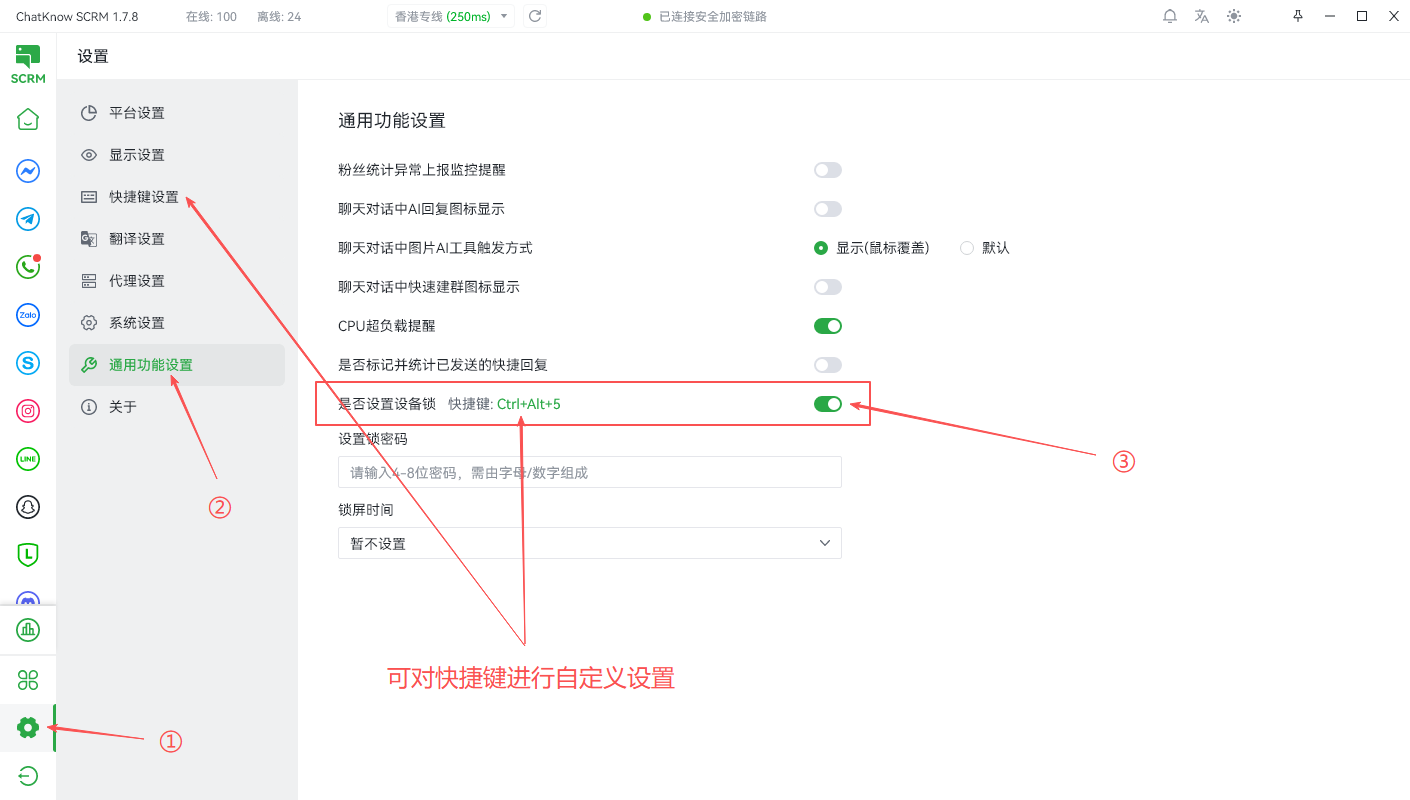
您可以在 设置 - 通用功能设置 中找到此功能入口。
开启后,支持设置 1-8 位由字母/数字组合的密码作为您的锁屏密码
您也可以设置自动锁屏时间,设置后在您ChatKnow长时间未进行任何操作时,会自动锁定设备
请您谨记您的密码。如您忘记密码时,您也可以联系您的主管为您清除设备锁的密码。在网络连接不稳定时您可以稍后再试,也可以提供您的会员账号+设备ID 联系 Chatknow 客服为您解决